
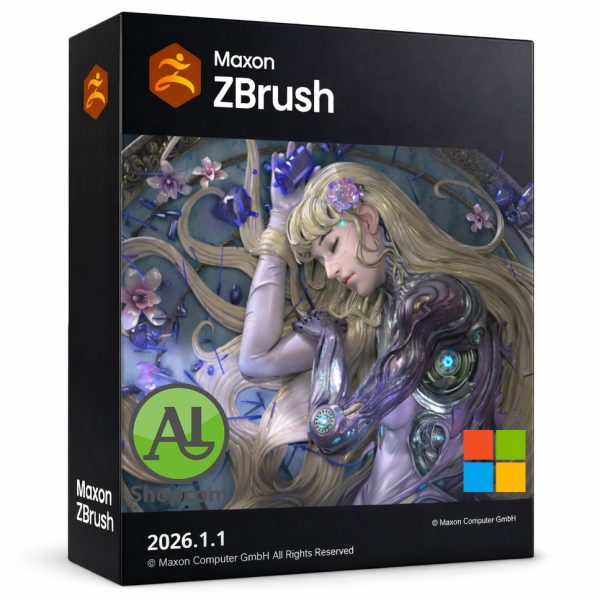
ZBrush 2026.1.1
3017 DT
Download link :
https://www.shopcom.tn/product/zbrush-2026-1-1/download
An Overview of ZBrush 2026.1.1
Pixologic Maxon ZBrush 2026.1.1 is a maintenance release for the renowned digital sculpting and painting software, now developed and distributed by Maxon following its acquisition of Pixologic. Positioned as a stable and refined iteration following the major feature introduction of ZBrush 2026.0, this version focuses on consolidating recent advancements, improving workflow consistency, and fixing bugs to ensure a reliable and efficient creative experience for digital artists across film, game development, illustration, and design industries.
The Core Philosophy of ZBrush
Since its inception, ZBrush has distinguished itself from traditional 3D modeling software through its unique paradigm. Instead of manipulating individual vertices, edges, and polygons, ZBrush treats 3D models like virtual clay. Its core technology, the “pixol,” allows it to store not only position but also color, material, and depth information for every point on the screen. This enables artists to sculpt and paint in real-time on models containing millions of polygons without lag, a capability for which the software’s underlying technology received an Academy Award.
ZBrush provides an environment where the primary goal is artistic expression, unburdened by technical constraints, making it a powerful tool for concept artists, character modelers, and anyone seeking to bring highly detailed organic or hard-surface creations to life.
Key Enhancements in the ZBrush 2026 Series
ZBrush 2026.0 was a significant update that laid the groundwork for the 2026.1.1 maintenance release. Understanding the features introduced in the initial 2026 version is essential to appreciating the context of the subsequent update.
Desktop Version 2026.0 Highlights:
-
Python Scripting Support: This was the most transformative addition to ZBrush 2026.0. By introducing Python scripting alongside the existing ZScript language, Maxon opened the software to a vast ecosystem of tools and pipelines. Python is an industry-standard scripting language, and its integration allows studios to automate complex, repetitive tasks, customize the user interface, and seamlessly integrate ZBrush into established production workflows. This update significantly enhanced ZBrush’s utility in professional, pipeline-driven environments.
-
Enhanced ZModeler: The powerful, polygon-based modeling toolset, ZModeler, received several improvements aimed at precision and speed. Visual feedback for interactive actions was refined, and new auto-creasing options were added. Now, when performing actions like inserting an edge loop or insetting a polygon face, artists can have ZModeler automatically apply edge creases, which is invaluable for creating sharp, defined edges in hard-surface modeling without needing to manually manage subdivision smoothing afterward.
-
NoiseMaker Updates: The procedural noise generation system, NoiseMaker, became more versatile. Artists gained the ability to directly transform (rotate, scale, and offset) the alpha images used as noise sources within the plugin. This eliminates the need to edit images in external software for simple adjustments, providing greater on-the-fly control for creating intricate surface details and textures.
ZBrush for iPad 2026.0 Highlights:
The iPad version saw a major push towards feature parity with its desktop counterpart, establishing it as a serious mobile production tool.
-
Plugin Integration: Two critical desktop plugins, 3D Print Hub and Scale Master, were brought to the iPad. 3D Print Hub simplifies the process of preparing models for 3D printing with direct export to formats like STL and 3MF. Scale Master allows artists to work in real-world units (like meters or centimeters), a necessity for any project requiring precise physical dimensions.
-
UI and Workflow Parity: The iPad version received the same ZModeler and NoiseMaker enhancements as the desktop. Furthermore, significant UI improvements, such as the ability to import and export UI presets, made it possible for artists to maintain a consistent and personalized workspace across both desktop and iPad, facilitating a seamless transition between devices.
Specific Focus of Version 2026.1.1
As a point release, ZBrush 2026.1.1 builds upon the foundation of 2026.0, focusing on refinement and stability. According to the official Maxon “What’s New” guide, version 2026.1 introduced several targeted improvements that are carried forward in 2026.1.1 :
-
IMM (Insert Multi-Mesh) Viewer System Update: This system, which is fundamental for managing and using brush libraries containing multiple 3D elements (like IMM brushes, VDM brushes, and retopo brushes), was updated to work with subtool folder structures. This allows artists to create custom, organized brushes simply by structuring their source meshes into folders, making it far easier to manage large and complex brush libraries.
-
User Folder Restructuring: A significant under-the-hood change was implemented to improve software management and stability. The main ZBrush installation folder is now read-only. All user-generated content—such as custom brushes, alphas, and materials—is now automatically stored in dedicated user profile directories. This separation prevents user data from being accidentally overwritten during software updates and simplifies backup and migration to new computers. It also led to the creation of two distinct Lightbox systems: a Maxon Lightbox (for built-in, official assets) and a User Lightbox (for custom, personal assets).
-
Manual Retopology Tools: ZBrush 2026.1 added new tools to aid in manual retopology, the process of creating a clean, production-ready mesh from a high-density sculpt. These include standard poly-modeling actions like Insert Edge Loop, Insert Multiple Edge Loops, and Inset Polygon Face, giving artists more precise control during the re-meshing process directly within ZBrush.
Conclusion
ZBrush 2026.1.1 represents the mature, stable state of the software following the major updates of the 2026 cycle. It combines the power of the 2026.0 features—most notably Python scripting, enhanced ZModeler capabilities, and expanded iPad functionality—with the organizational and usability refinements of the 2026.1 update. It is a version that prioritizes a reliable, efficient, and integrated experience for digital artists, solidifying ZBrush’s position as the industry standard for digital sculpting by bridging the gap between powerful desktop pipelines and a flexible, mobile creative process.
Produits similaires
-
SolidWorks 2025 SP4.0 Premium
31735 DT -
SketchUp 2026 V26.0.429
3273 DT -

OriginPro 2025b
6785 DT -
Enscape V4.13.0.619
3331 DT
Avis
Il n’y a pas encore d’avis.